Elegant Watercolor Rose Floral Wedding Card Design
There’s a moment when you open a wedding invitation and it instantly sets the tone for the entire celebration. The soft wash of dusty rose, the delicate brushstrokes of greenery, the elegant typography—it all whispers of romance and careful planning. This is the power of a well-designed Watercolor Rose Floral Wedding Card. It’s more than just paper and ink; it’s the first chapter of your wedding story, delivered to your guests. For designers and couples alike, finding a template that balances artistic beauty with practical customization is key, and that’s exactly where this design shines.
Beyond the Wedding: A Versatile Design Asset
While the primary use is clear, the true value of a premium design asset like this lies in its versatility. The soft, organic watercolor style paired with classic serif and elegant script fonts creates a visual language that transcends a single event. Imagine using these elements to build a cohesive brand identity for a boutique wedding planning service, a floral studio, or a high-end stationery shop. The dusty rose and greenery palette is incredibly adaptable, lending itself beautifully to logo design where a subtle, artistic touch is needed. It can elevate social media graphics for lifestyle bloggers, add a romantic flourish to packaging for artisanal products, or serve as the foundation for a beautiful, professional-looking website header.
The included vector files (EPS) are the real workhorse here. Because they are fully editable in Adobe Illustrator or similar software, you are not locked into the initial layout. Need to adjust the placement of a floral element for a poster? Easy. Want to change the color of the greenery to match a client’s specific brand guidelines? Done in minutes. This level of control transforms a static template into a dynamic toolkit for creating a wide array of marketing assets, editorial layouts, and digital products. It’s a practical solution for creative entrepreneurs who need to maintain visual consistency across multiple platforms without starting from scratch each time.
The Anatomy of an Effective Invitation Suite
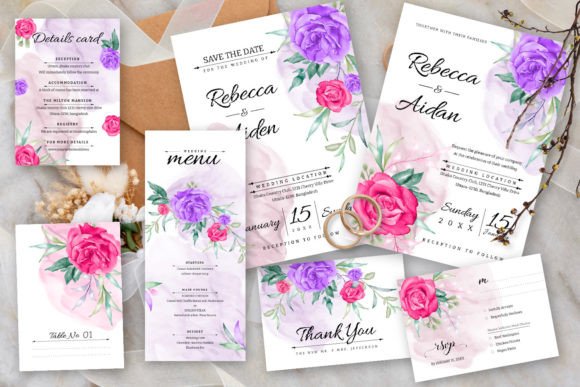
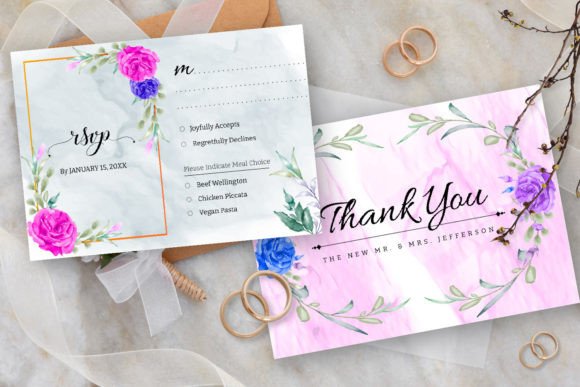
A successful wedding invitation suite does more than just inform; it communicates mood, formality, and personality. This particular design excels because every element is intentionally chosen. The watercolor rose provides a focal point of soft, romantic color, while the greenery leaves add a touch of natural elegance and frame the text beautifully. The typography is critical—the combination of a clean, readable serif for the details and a graceful script for the names creates hierarchy and sophistication. The inclusion of a matching RSVP card (sized at 3.5"x5") ensures the entire suite feels unified and professionally considered.
For the DIY bride or a small design studio, this structured approach is invaluable. It removes the guesswork from font pairing. Instead of spending hours testing different typefaces, you have a curated system where the fonts work in harmony. The free font licensing is also a significant practical benefit, eliminating any hidden costs or legal headaches for commercial use. This allows you to focus on the creative side—personalizing the text, fine-tuning the layout, and adding those final bespoke touches that make the invitation truly unique.
Practical Tips for Customization and Application
To get the most out of a template like this, think beyond simple text replacement. Here’s how to approach it with a designer’s mindset:
- Color Tweaking: While the dusty rose is perfect for many themes, don’t be afraid to adjust it. In Illustrator, you can select the watercolor elements and shift the hue to a blush pink, a terracotta, or even a muted lavender to match a specific wedding palette. The same goes for the greenery—try a deeper olive or a brighter sage.
- Layout Flexibility: The 5"x7" size is a classic, but the vector format allows you to scale and rearrange elements. Could the floral arrangement work better at the bottom? Can you use just a single rose as a monogram for a wax seal design? Experiment with isolating components for other projects, like table numbers or ceremony programs.
- Font Application: The included fonts are assets in their own right. Use the elegant script for thank-you cards or menu headers. The serif font is excellent for any body text where readability is paramount, making it a good candidate for accompanying detail cards or even a wedding website’s main typography.
Remember, the goal is to use the template as a strong starting point, not a rigid cage. Its strength lies in providing a professional foundation that you can build upon, ensuring the final product looks custom-designed.
Ensuring a Professional and Cohesive Result
Whether you’re creating an invitation for your own wedding or for a client, the final output must be polished. Always work with the provided bleed area to avoid unprinted edges after trimming. Double-check the spelling of every name and detail—typos on a wedding invitation are notoriously difficult to fix after printing. When exporting your final files for print, use high-resolution PDFs (typically 300 dpi) and ensure all fonts are outlined or embedded to prevent substitution issues at the print shop.
For digital use, such as email invitations or social media announcements, the JPG files are ready to go. However, for the sharpest results on websites or blogs, consider exporting a optimized PNG from your vector file to maintain transparency and crisp lines. This attention to technical detail is what separates an amateur project from a professional one, ensuring your beautiful Watercolor Rose Floral Wedding Card design is presented flawlessly in every context. It’s this combination of artistic beauty and practical, editable design that makes such a template a valuable addition to any designer’s toolkit or a bride’s planning resources.